![[PukiWiki]](image/pukiwiki.png "[PukiWiki]")
※前提条件:本文基于 Vue 2.0 创作
引入 compression-webpack-plugin 插件,然后开启 gzip 来解决本问题
npm install --save-dev compression-webpack-plugin
修改 config/index.js 文件
productionGzip 改为:true
“启用或关闭windows功能”里面找到“Internet Information Services”勾选
IIS的配置里面打开“压缩”,开启动态和静态内容压缩
在C:\Windows\System32\inetsrv\config目录,编辑applicationhost.config文件,dynamicTypes节点里面添加下面两行
 <add mimeType="application/json" enabled="true" />
 <add mimeType="application/json;charset=utf-8" enabled="true" />
变成
<httpCompression directory="%SystemDrive%\inetpub\temp\IIS Temporary Compressed Files">
 <scheme name="gzip" dll="%Windir%\system32\inetsrv\gzip.dll" />
 <dynamicTypes>
     <add mimeType="text/*" enabled="true" />
     <add mimeType="message/*" enabled="true" />
     <add mimeType="application/x-javascript" enabled="true" />
     <add mimeType="application/javascript" enabled="true" />
     <add mimeType="application/json" enabled="true" />
     <add mimeType="application/json;charset=utf-8" enabled="true" />
     <add mimeType="*/*" enabled="false" />
 </dynamicTypes>
 <staticTypes>
     <add mimeType="text/*" enabled="true" />
     <add mimeType="message/*" enabled="true" />
     <add mimeType="application/javascript" enabled="true" />
     <add mimeType="application/atom+xml" enabled="true" />
     <add mimeType="application/xaml+xml" enabled="true" />
     <add mimeType="application/json" enabled="true" />
     <add mimeType="application/json;charset=utf-8" enabled="true" />
     <add mimeType="image/svg+xml" enabled="true" />
     <add mimeType="*/*" enabled="false" />
 </staticTypes>
</httpCompression>
通过cmd 管理员权限执行 iisreset 重启服务
问题:
ValidationError: Invalid options object. Compression Plugin has been initialized using an options object that does not match the API schema.
 - options has an unknown property 'asset'. These properties are valid:
   object { test?, include?, exclude?, algorithm?, compressionOptions?, threshold?, minRatio?, deleteOriginalAssets?, filename? }
对策:
修改 build\webpack.prod.conf.js ,找到如下内容,将 assert 修改为 filename:
webpackConfig.plugins.push(
  new CompressionWebpackPlugin({
    //filename: '[path].gz[query]',
    filename: '[path][base].gz[query]', //使用这个否则报警 Conflict: Multiple assets emit different content to the same filename assets/js/.gz
    algorithm: 'gzip',
    test: new RegExp('\\.(' + config.build.productionGzipExtensions.join('|') + ')$'),
    threshold: 10240, // 资源大于10240=10KB时会被压缩
    minRatio: 0.8,
    deleteOriginalAssets: false, // 是否删除原资源
  })
);
在使用 compression-webpack-plugin 插件时报这个错误,原因是版本问题
TypeError: Cannot read property ‘tapPromise‘ of undefined
先卸载之前安装的compression-webpack-plugin插件
npm uninstall compression-webpack-plugin
再安装指定版本的插件
npm install compression-webpack-plugin@6.1.1
安装插件
npm i webpack-bundle-analyzer -D
或者
cnpm install webpack-bundle-analyzer --save-dev
/build/webpack.prod.conf.js文件中配置:
//文件开始位置
const BundleAnalyzerPlugin = require('webpack-bundle-analyzer').BundleAnalyzerPlugin

// 然后plugins里面,添加配置:
plugins: [
    new BundleAnalyzerPlugin()
]
在package.json文件中配置:
"scripts": {
    "analyzer": "NODE_ENV=production npm_config_report=true npm run build"
}
运行 npm run build
会自动在浏览器打开:http://127.0.0.1:8888/
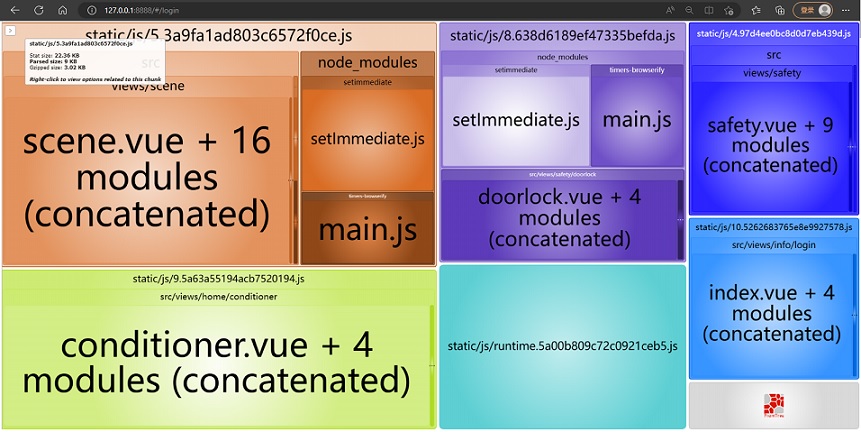
注意:需要保证8888端口空闲
webpack升级webpack4后打包出现文件大小警告提示。
实际项目中没有 webpack.config.js 文件时,修改webpack.base.config.js文件中配置
module.exports = {
  performance: {
    hints: 'warning',
    //入口起点的最大体积 整数类型(以字节为单位)
    maxEntrypointSize: 50000000,
    //生成文件的最大体积 整数类型(以字节为单位 300k)
    maxAssetSize: 30000000,
    //只给出 js 文件的性能提示
    assetFilter: function(assetFilename) {
      return assetFilename.endsWith('.css') || assetFilename.endsWith('.js');
    }
  },
  mode: process.env.NODE_ENV === 'production' ? 'production' : 'development',
  context: path.resolve(__dirname, '../'),
  entry: {
    app:  ["babel-polyfill", "./src/main.js"]
  },
........
}
コメント:


